BetterApps
BetterClips app iconBetterEdits app iconBetterClips + BetterEdits for macOS · built for Claude Code

BetterAppsFind the shot. Cut the reel.

Two native Mac apps that work as one. BetterClips is the library that finds the shot you mean. BetterEdits is the editor that cuts it into a reel. Both take orders from Claude Code.

Free to download · 3-day trial with 100 AI credits · your footage stays in folders you own

Claude Code>pull the best gym clips from the library, cut a 9:16 reel with captions, export 4K
Golden hourIn library
Guides
Fit9:16
No talking heads.
just cuts, fast ones
00:09.14/ 00:20.00Snap
0:00
0:02
0:04
0:06
0:08
0:10
0:12
0:14
0:16
0:18
0:20
No talking heads.
Step 2 — brew
so here's the thing
no talking heads
just cuts, fast ones
import, trim, done
then ship it
IMG_4819.MOV
IMG_4821.MOV
100%
IMG_4823.MOV
70%
B-roll: gym
gym-kettlebell-swing.mov
IMG_4830.MOV
Voiceover 1
Recording…
lofi-morning.m4a
45%
Summer shootAdd filterImported ↓
gym-kettlebell-swing.mov0:12
★★★★★Location: GymVibe: Energetic
gym-battle-ropes.mov0:08
★★★★★Location: GymVibe: Energetic
gym-sled-push.mp40:10
★★★★Location: Gymb-roll
alps-sunrise-drone.mp40:15
★★★★Location: Alpsdrone
neon-rain-street.mov0:10
★★★★★Location: DowntownMood: Moody
forest-canopy-drone.mp40:12
★★★dronenature
energetic gym clips, portrait, from this summer
Filter built
Orientation is PortraitLocation: GymVibe: EnergeticImported Jun–Aug
2 clips · newest firstSave as view
Native Swift
AVFoundation, AppKit, SwiftUI. No web view, no waiting.
Files you own
A library is a folder. A project is JSON next to its media.
Claude Code inside
A CLI in every bundle and a CLAUDE.md in every folder.
AI credits included
Every plan covers the model calls. Top up when you run out.
The apps

Two tools, one job each.

No suite bloat. Each app does one part of the work extremely well, and they hand off to each other with a drag.

BetterClips app icon
Find the shot

BetterClips

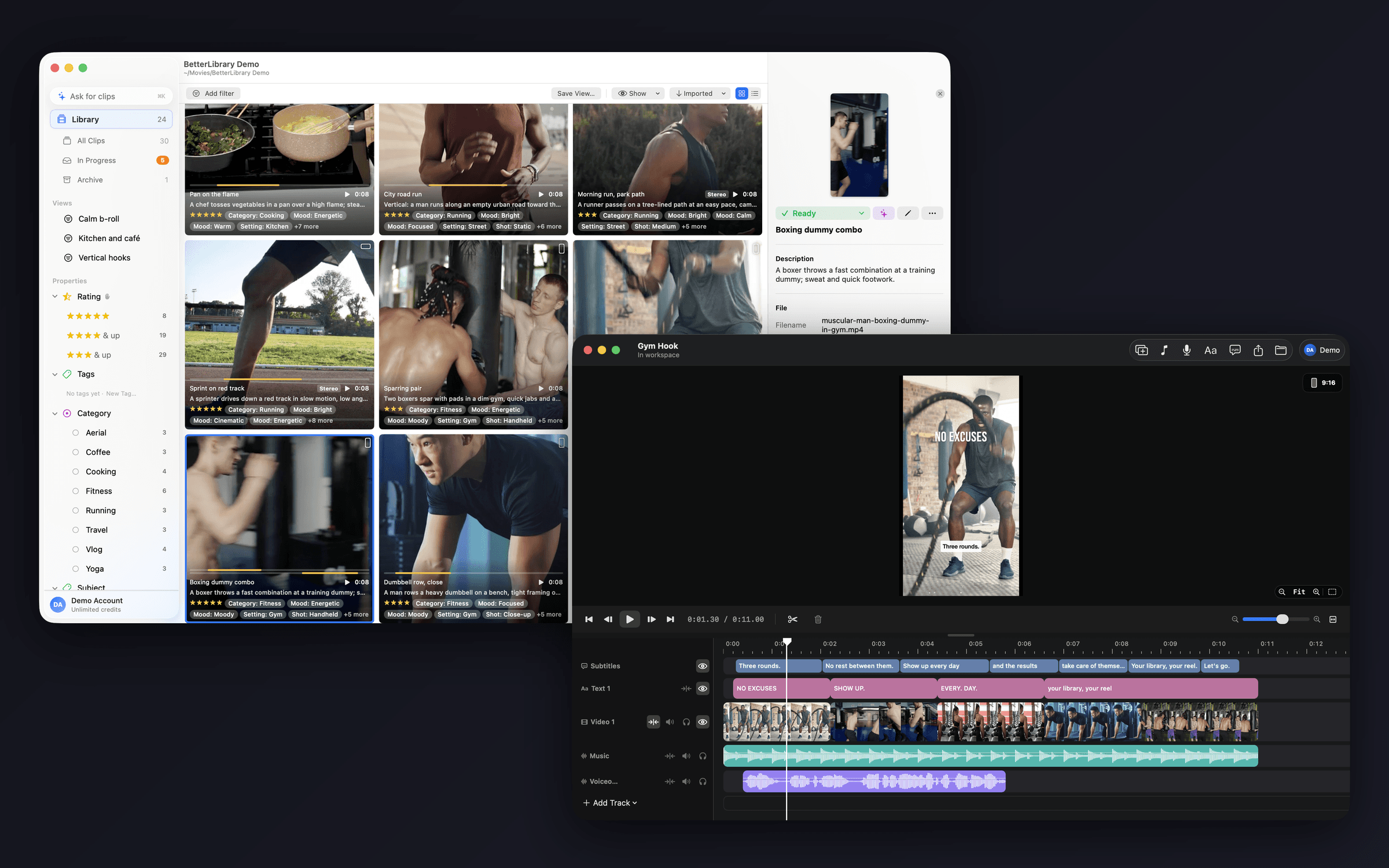
A clip library for the Mac. Import footage, let AI name, describe and tag every clip in your own vocabulary, approve the keepers, then ask for what you need in plain words and drag the highlight straight into your edit.

  • Ask for clips. Describe the footage you want in a sentence. The model turns it into a real filter you can see, change and save.
  • AI tagging in your vocabulary. Properties and tags are yours. The model reads their descriptions and can only pick from what you defined.
  • Highlights you can drag. Mark the moment inside a clip, then drag it onto Final Cut or Finder as a real, losslessly trimmed file.
BetterEdits app icon
Cut the reel

BetterEdits

A deliberately small, fast single-timeline video editor for the Mac, in the spirit of Instagram's Edits. Drop in footage, cut, add voiceover and subtitles, export at 9:16. Nothing ever waits on you.

  • One timeline, frame-exact. Drag a clip and its neighbours slide out of the way. Trim an edge and the viewer shows the exact frame while you drag.
  • Subtitles in one click. The track's sound goes to Deepgram and comes back as short bars you can edit inline and style with a live 9:16 preview.
  • Voiceover that ducks the music. ⌘R records from the playhead while the timeline plays, drawing the take live. Music ducks automatically.
BetterClips app icon
I have a mess of footage.

Start with BetterClips. Import the shoot, let AI tag it in your words, approve the keepers, ask for the shot you need.

BetterEdits app icon
I have the clips. I need the reel.

Start with BetterEdits. One timeline, frame-exact trims, captions in one click, voiceover that ducks the music, 4K HDR out.

BetterClips app iconBetterEdits app icon
I do the whole thing, every week.

Take the bundle. A highlight drags straight from the library onto the timeline, and Claude Code can run the loop end to end.

Together

From a folder of footage to a reel, in four moves.

This is why the bundle exists. The library knows what you shot; the editor knows what to do with it.

  1. 01BetterClips app icon

    Import and approve

    Drop a shoot folder on BetterClips. AI names, describes and tags every clip in your vocabulary; you read, fix and press ⌘R.

  2. 02BetterClips app icon

    Ask for the shot

    “Energetic gym clips, portrait, from this summer.” ⌘K turns the sentence into a real filter and a list of highlights.

  3. 03BetterEdits app icon

    Drag it onto the timeline

    A highlight drops into BetterEdits as a losslessly trimmed file. Neighbours slide out of the way and snap into place.

  4. 04BetterEdits app icon

    Caption, voice, export

    Subtitles in one click, a voiceover that ducks the music, and a 4K HDR export at 9:16 before your coffee is cold.

Claude Code

Both apps take orders from Claude Code.

This isn't a plugin. Every library and project folder carries a generated CLAUDE.md, and each app ships its own command line inside the bundle. Open Claude Code in the folder and say what you want.

  • >Tag everything from yesterday's shoot and mark the best 5 seconds of each clip.
  • >Find the three most energetic gym clips and cut them into a 9:16 reel with captions.
  • >Replace the B-roll placeholder with the drone shot and re-export in 4K.
~/Movies/Summer shoot — claude
> Find the three best energetic gym clips, cut them into a 9:16 reel with captions, and export it.
betterclips clips list --search "energetic gym" --mode meaning --json
3 clips · gym-kettlebell-02, gym-rope-slams, gym-sled-push
betterclips highlights export 3f9a c21e 7b40 --to ./reel
3 files · lossless trims · 41 MB
BetterEdits cli project-new Gym-reel --ratio 9:16
Gym-reel · 9:16 · in library
BetterEdits cli media-import ./reel/*.mov --track v1
v1:1 v1:2 v1:3 · 24.6 s
BetterEdits cli captions-generate --track v1
19 bars on s1 · Deepgram nova-3 · en
BetterEdits cli export --resolution 4k --fps 30
exports/Gym-reel.mp4 · 58 MB · 7.4 s
Done. The clips came from your library, the cut is open in BetterEdits, and every step is one undo.
>
AI credits

The model calls are covered. Top up when you need more.

Tagging, asking, subtitles and reel cloning talk to Gemini, Deepgram and a gateway model. Every plan includes a monthly allowance of AI credits that pays for them, and packs top it up and never expire. The apps show the price of every call before it runs, and never charge silently.

600 / mo with BetterClips1,200 / mo with BetterEdits2,400 / mo with BetterApps Bundle
How credits work
BetterClips app icon
Tag a clip with AI
Gemini
4 credits
per clip
BetterClips app icon
Ask for clips
gateway model
1 credit
per question
BetterEdits app icon
Subtitles
Deepgram
2 credits
per minute
BetterEdits app icon
Clone a reel
Gemini + gateway
40 credits
per reel
100 credits to try during the 3-day trial.
How we build

Small apps. Serious engineering.

Files you own

A library is a folder with your originals, an SQLite index and thumbnails. A project is JSON next to its media. Move them, back them up, open them on another Mac.

Native and fast

Swift, AVFoundation, AppKit and SwiftUI. The preview scrubs 4K HDR footage at 1080p, edits never wait on a spinner, and a one-file change rebuilds in seconds.

AI only when you say

Every model call is a feature you turn on, priced in credits you can see. Search runs on-device. Turn the AI off and nothing leaves your Mac.

Pricing

Each app on its own, or both for 23% less.

Every plan starts with a free trial, includes a monthly allowance of AI credits, and can be cancelled any time. Your libraries and projects are files on your Mac and keep opening regardless.

Every plan starts with a 3-day free trial and 100 AI credits. Cancel any time.
BetterClips

The clip library. Find the shot you mean.

$4.99/ month
Billed monthly. Cancel any time.
600 AI credits a month
Start 3-day trial
BetterEdits

The editor. Cut, caption, export.

$12/ month
Billed monthly. Cancel any time.
1,200 AI credits a month
Start 3-day trial
BetterApps Bundle
Best value

Both apps, one subscription. Footage in, reel out.

$13/ month
Billed monthly. Cancel any time. 23% less than both apps.
2,400 AI credits a month
Start 3-day trial
FAQ

Questions people ask first

Do I need both apps?
No. Each app stands alone and has its own subscription. The bundle is for people who go from shoot to post in one sitting; it is cheaper than the two together and adds the drag-and-drop handoff between them.
Is there a free version?
Both apps are free to download, and every plan starts with a 3-day trial that includes 100 AI credits. Cancel during the trial and you pay nothing. Sign in inside the app with the same account you use here.
What are AI credits?
The unit the apps spend when they call a model: tagging a clip, asking for clips, transcribing a minute, cloning a reel. Every plan includes a monthly allowance, and packs you buy never expire.
What exactly does Claude Code do with the apps?
Each app has a command line that applies the same rules as the window, and every library or project folder carries a CLAUDE.md that teaches it. Claude Code can search, tag, cut, caption and export from a prompt, and every step lands as an ordinary undo.
Which Macs?
BetterClips runs on macOS 14.4 or later, Apple silicon or Intel. BetterEdits needs macOS 15 or later, Apple silicon; its preview and export lean on the media engine of the M-series chips.
What happens to my work if I cancel?
Nothing. Libraries and projects are plain files on your Mac. The apps keep opening them; only the included credits, 4K export and updates go away when the period ends.
BetterClips app iconBetterEdits app icon

BetterApps. Find it. Cut it. Ship it.

One account for both apps. Start with the one you need today; the bundle is a click away when you want the other.